Indoor cycling for macOS and your phone

You already bought the bike. Stop paying rent to ride it.

CrankHog drives your smart trainer in ERG, level, slope or heart-rate mode, runs structured workouts and FTP tests, rides real roads, and keeps every second on your Mac as a FIT file. It plans your runs and swims next to your rides, counts your training back from race day, and gives you a coach who rearranges your week when life gets in the way. It costs nothing, now or later.

v1.4.0 · Apple Silicon · Free and open source (MIT)

CrankHog Home: a velodrome seen from above with this week's rides lapping it, and a coach shouting from the infield through a megaphone

What it costs

  • $0a month
  • $0a year
  • 0trials ending
  • 0ads

No Premium tier, no annual plan with the cancel button four menus deep, and no "your trial has ended" email on the morning of your FTP test. The only thing it charges is your legs.

A quick tour

Ready to suffer?

Sir Loin, a hog in a cycling cap, with tusks
This is Sir Loin. He laps the velodrome on your home screen whether you ride or not, he turns up on the road ahead when you least want him to, and he has never once been FTP tested. On a week you haven't ridden, he has the whole track to himself.

Pick a ride and go

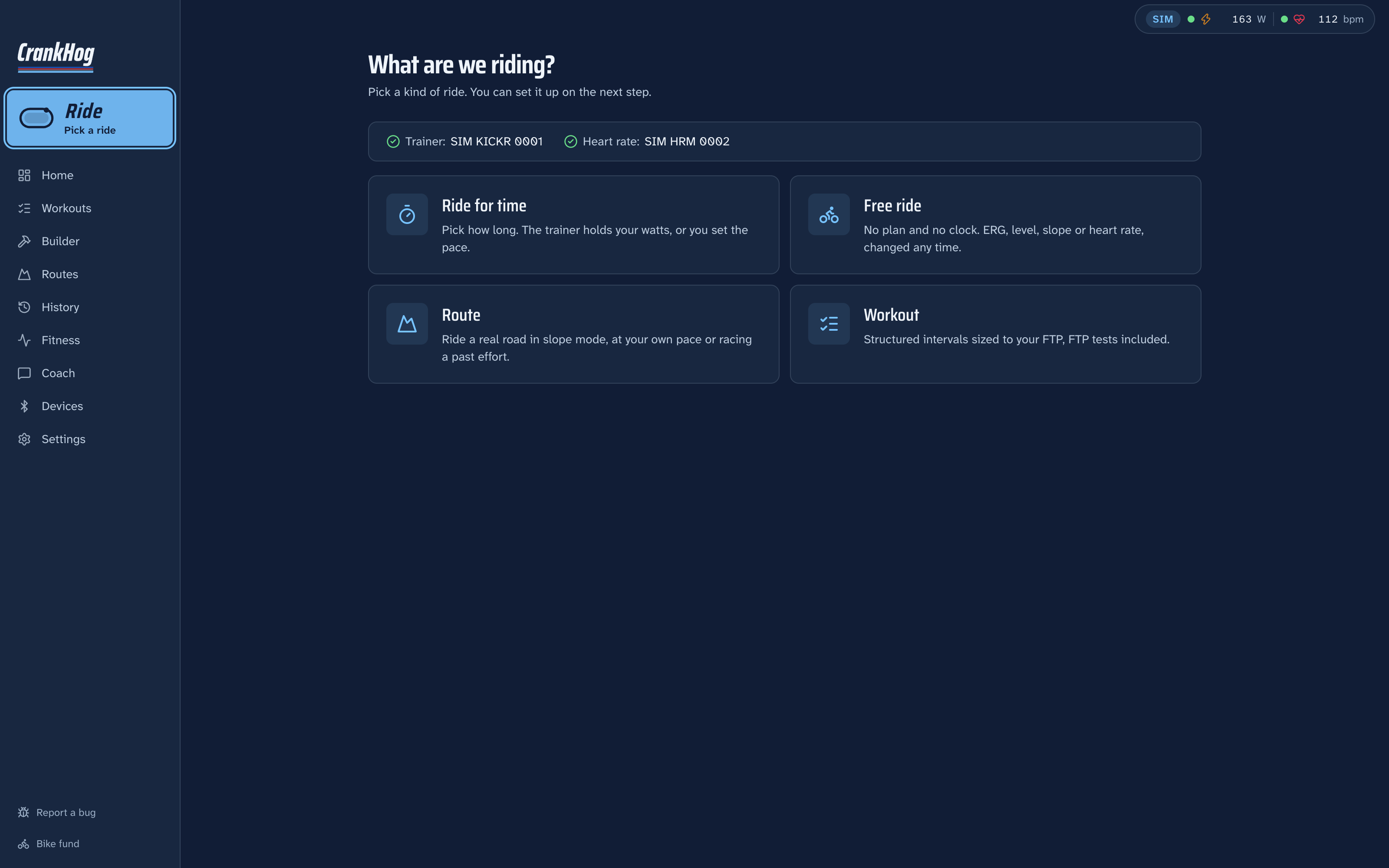
One big button, four choices: ride for time, free ride, a route or a workout. Your trainer and heart-rate status sit on top, so you know before you start.

Ride for time holds your watts from easy to sweet spot for 20 to 90 minutes. No forty-tab dashboard to decode before your warm-up.

The Ride picker: ride for time, free ride, route or workout, with the trainer and heart-rate status on top

Your coach rides with you

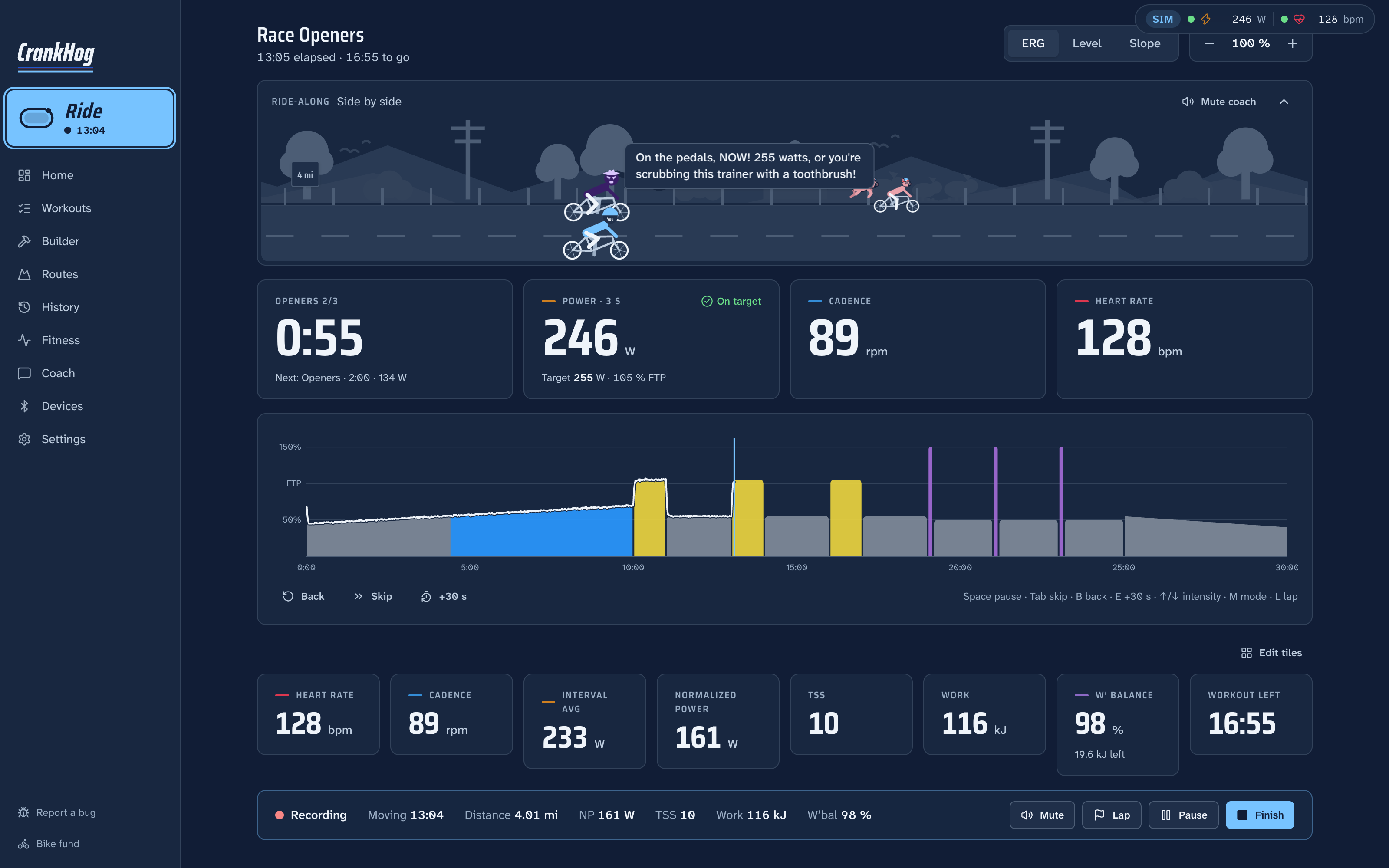
Your coach bikes next to you at your target. Ease off and they ride away and tell you about it. Push and you drop them, which is the best feeling in indoor cycling.

The big numbers stay big: interval, target and power, with the workout chart filling in as you go.

A workout mid-ride: the coach on the ride-along, the interval, target and power numbers, and the workout chart filling in

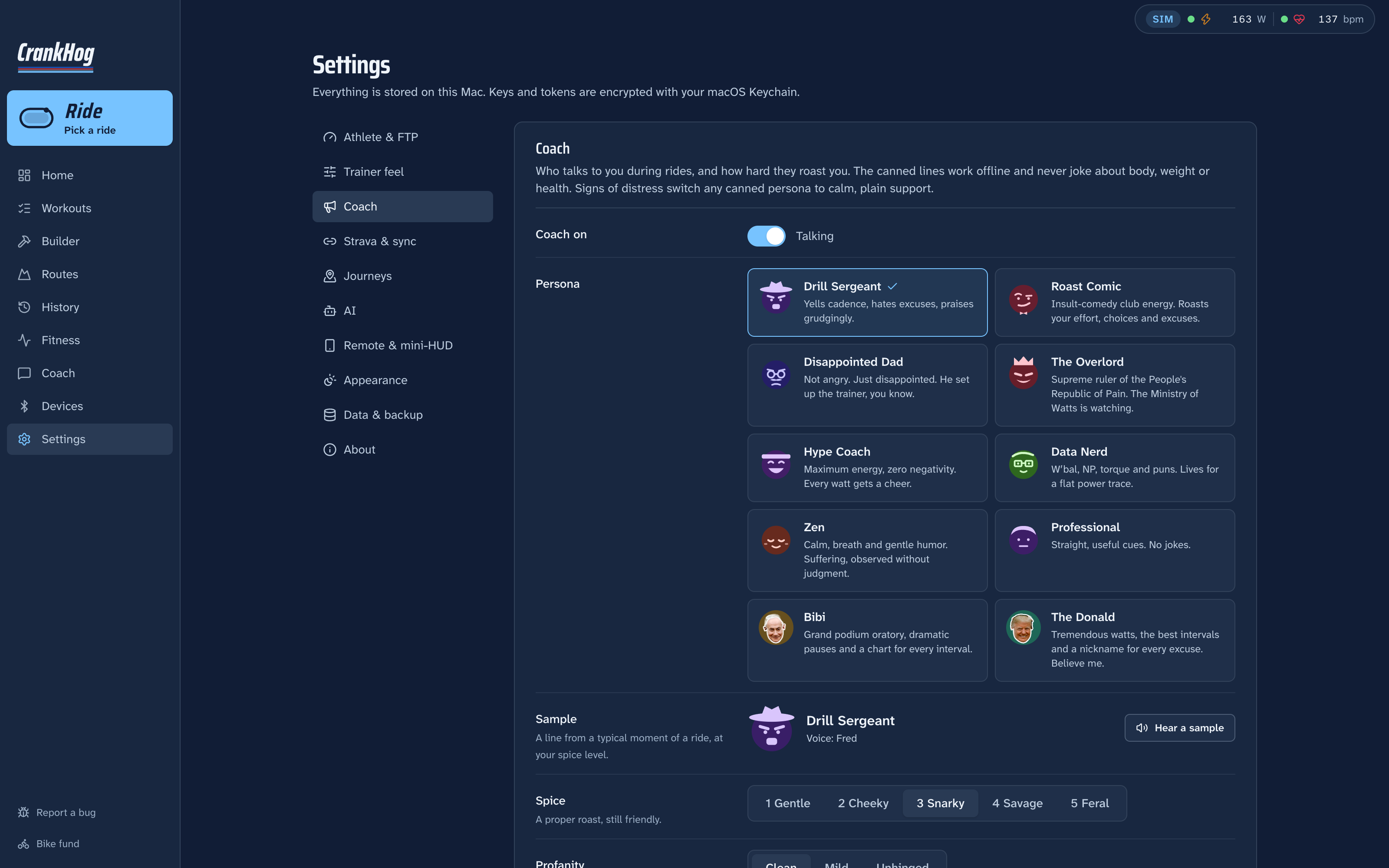
Twenty-seven coaches, five spice levels, three kinds of language

From a calm Zen master to a drill sergeant, a disappointed dad and a data nerd. Then it gets dumb: an angry goose, a monkey called Mr. Bananas, a LinkedIn guy, an infomercial host, a nature narrator, a Gen Z intern, Fat Guy, and something under the trainer that only screams. Plus impressions of famous people, from presidents to a heavyweight champ. Or make your own: a name, a photo and a personality, and your AI writes their lines.

Spice runs from gentle to feral. Profanity goes from Clean to Mild to Unhinged. Unhinged means it. The coaches are written for adults and nothing is off limits, except that no coach will ever tell you to hurt yourself. If your heart rate looks wrong, every coach drops the act and turns supportive.

Coach settings: the personas, a sample line, spice from gentle to feral, and profanity from clean to unhinged

Then the coach does your admin

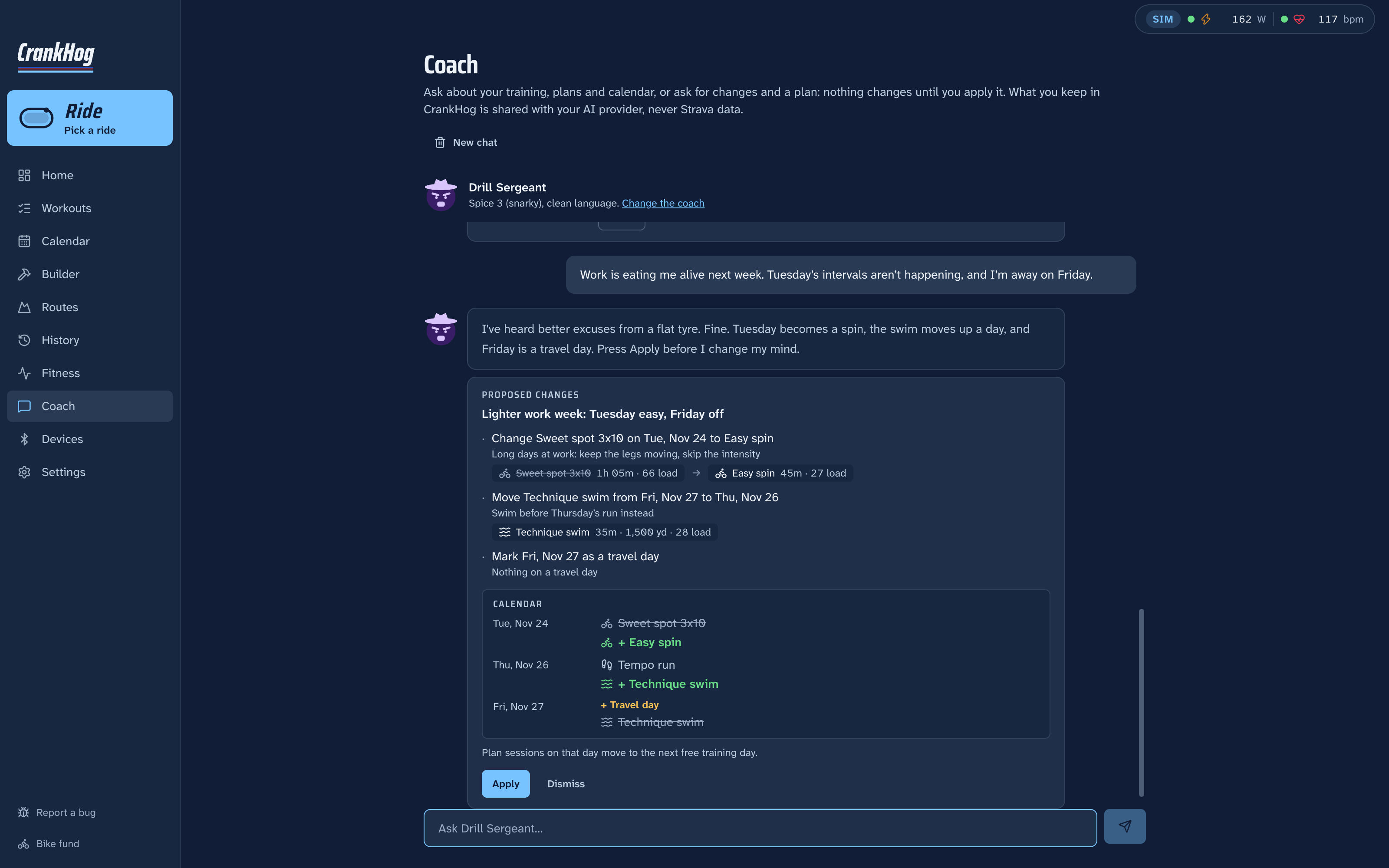
Tell your coach work is eating you alive, and you get a card back: Tuesday's intervals become an easy spin, the swim moves up a day, Friday turns into a travel day. Every change comes with its reason and the session before and after. Nothing moves until you press Apply, and Undo puts it all back.

It can add, move, swap or rewrite sessions, mark sick and travel days, move a race, log a squash game and set your FTP. It won't touch a session you've done, and it won't plan anything in the past.

The coach chat: the rider says work is busy and they're away Friday; the Drill Sergeant answers with a card of three changes, each with its reason, and the calendar before and after, waiting for Apply

And writes the whole plan

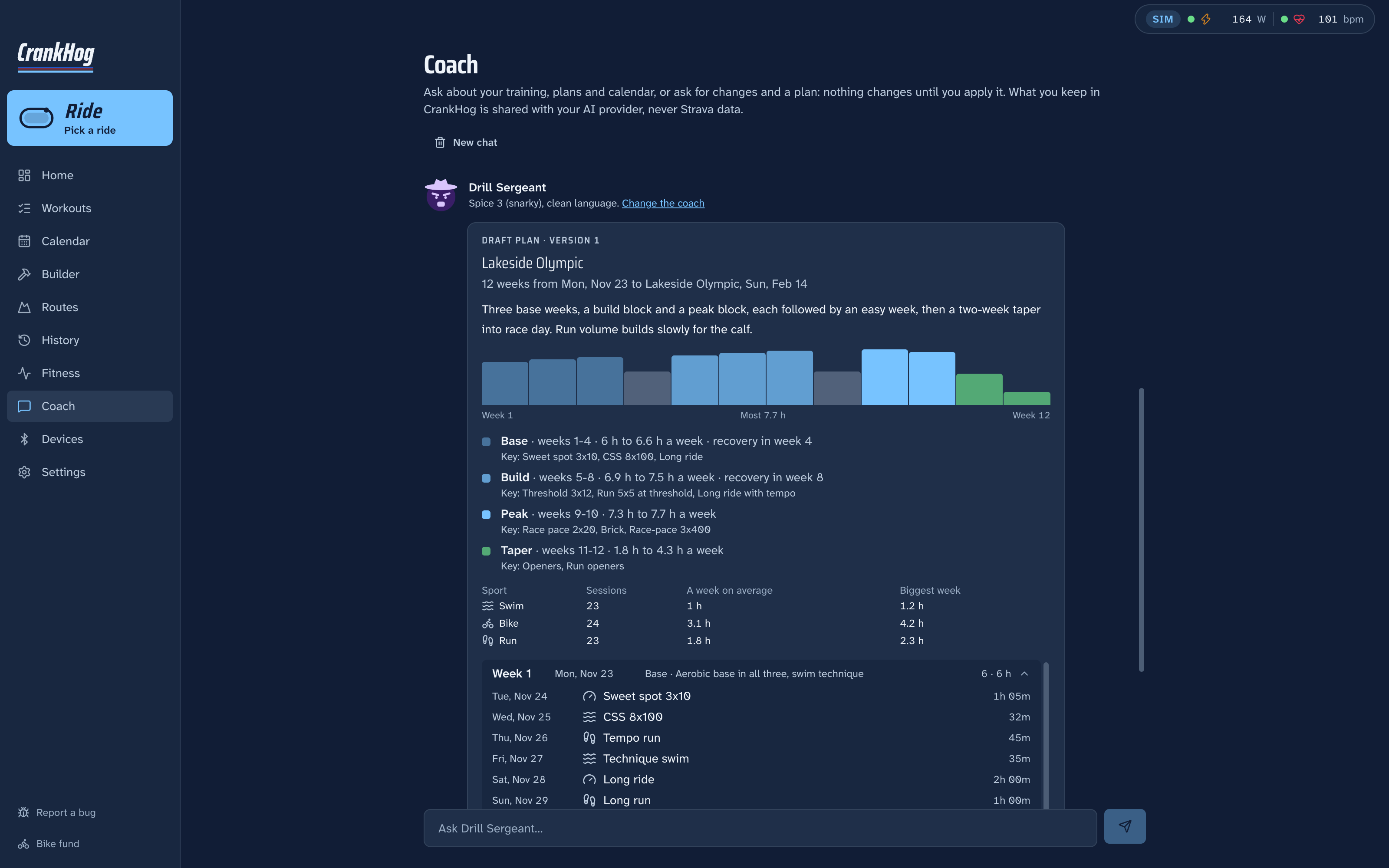
Ask for a plan for your race. The coach asks what it needs to know (your days, your hours, your pool, what hurts), then drafts every week: phases and recovery weeks, hours of each sport, and every session with its steps. Say "less swimming" and it rewrites only the weeks that change. Accept it and it lands on your calendar, counted back from race day.

Got a plan from a human coach? Drop in the spreadsheet, Word file or PDF, and your AI reads it into sessions you check before anything is saved. Works with Claude, OpenAI, Grok or a local Ollama.

A draft plan in the coach chat: twelve weeks to an Olympic triathlon, a bar for each week's hours, base, build, peak and taper with their key sessions, hours of each sport, and week one's sessions

A calendar for the whole week

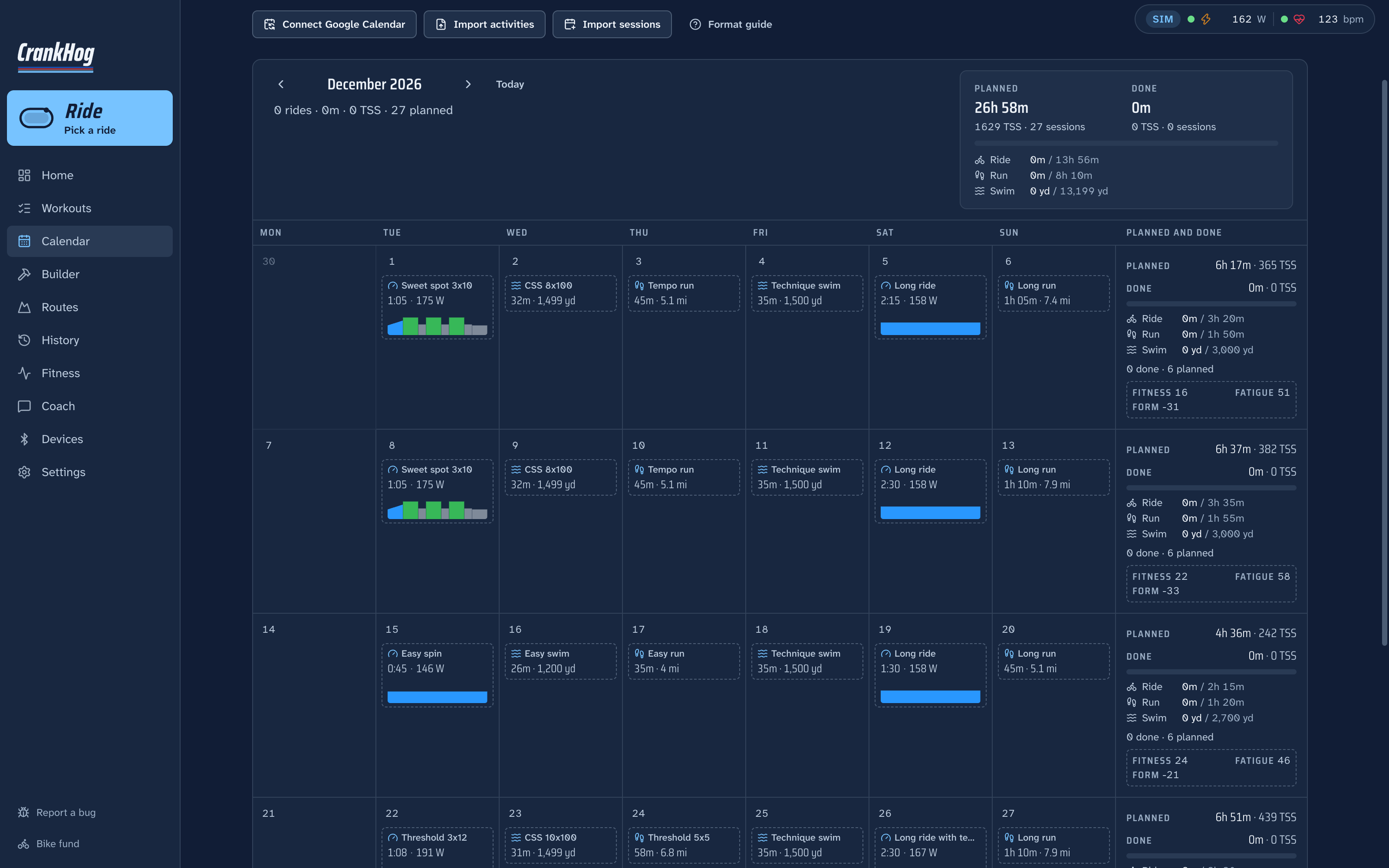
Every planned workout shows its length, load and shape. Done turns green, missed turns red. Drag a session to another day, mark your races and days off, and each week adds up your ride, run, swim and other time against the plan, with fitness and form projected ahead.

Runs, swims and squash come in from your watch's FIT files or intervals.icu, or you log them by hand. Your plan shows up in Google Calendar, and planned runs and swims go to your Garmin through intervals.icu.

The Calendar a month ahead: the triathlon plan's swims, rides and runs on their days, each with its length and load, and beside every week its planned time by sport and the fitness, fatigue and form it leads to

Workouts you can see before they hurt you

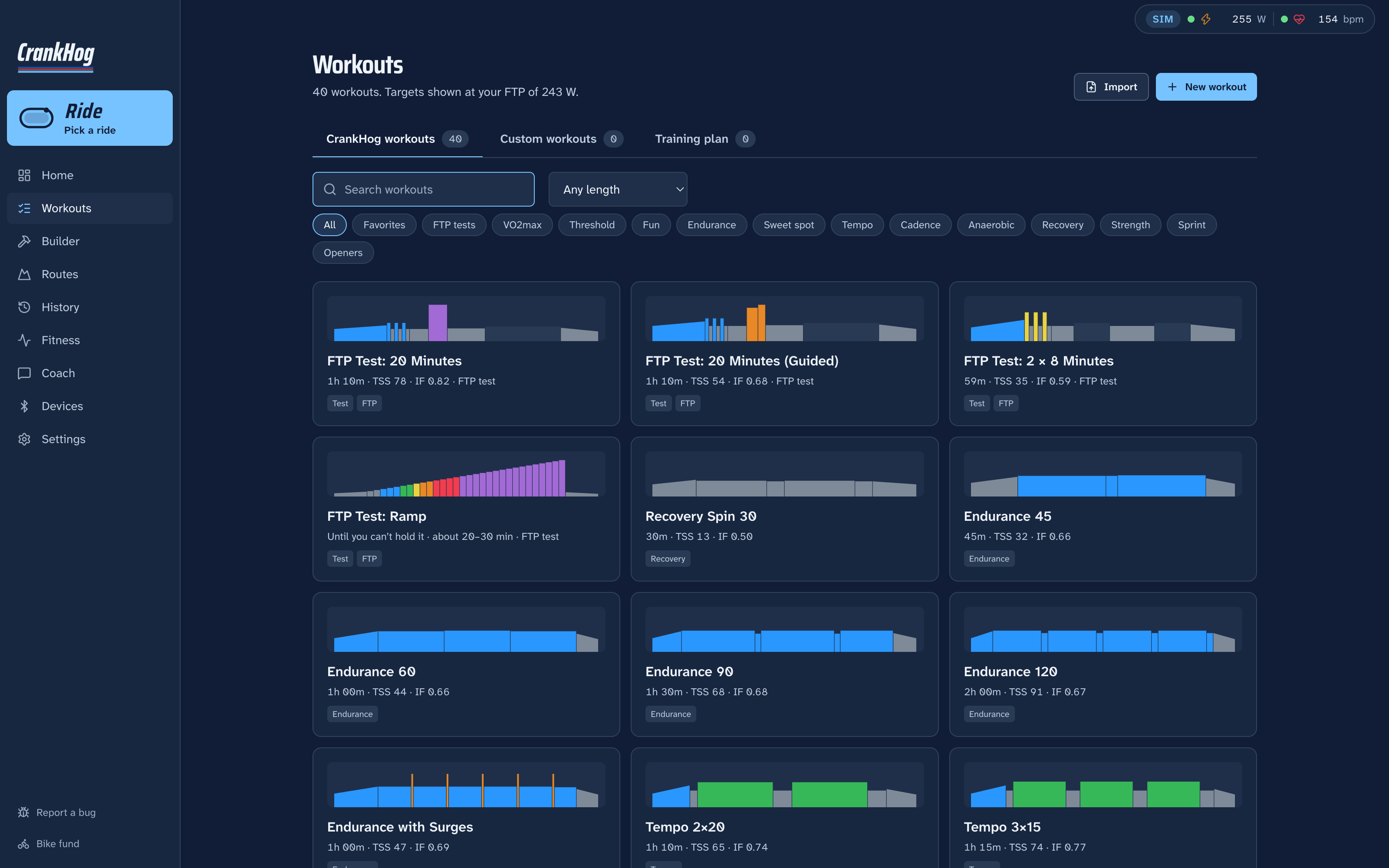
Every workout is drawn as its power profile at your FTP. Bike, Run and Swim each get a tab, and Bike has three shelves: CrankHog's own workouts, your custom ones, and your training plans.

There's an FTP test too: 20-minute, 8-minute or ramp. A valid result saves your FTP automatically, with one-click undo.

The Workouts page: Bike, Run and Swim tabs, and every bike workout drawn as its power profile at your FTP

And some your old app would never have shipped

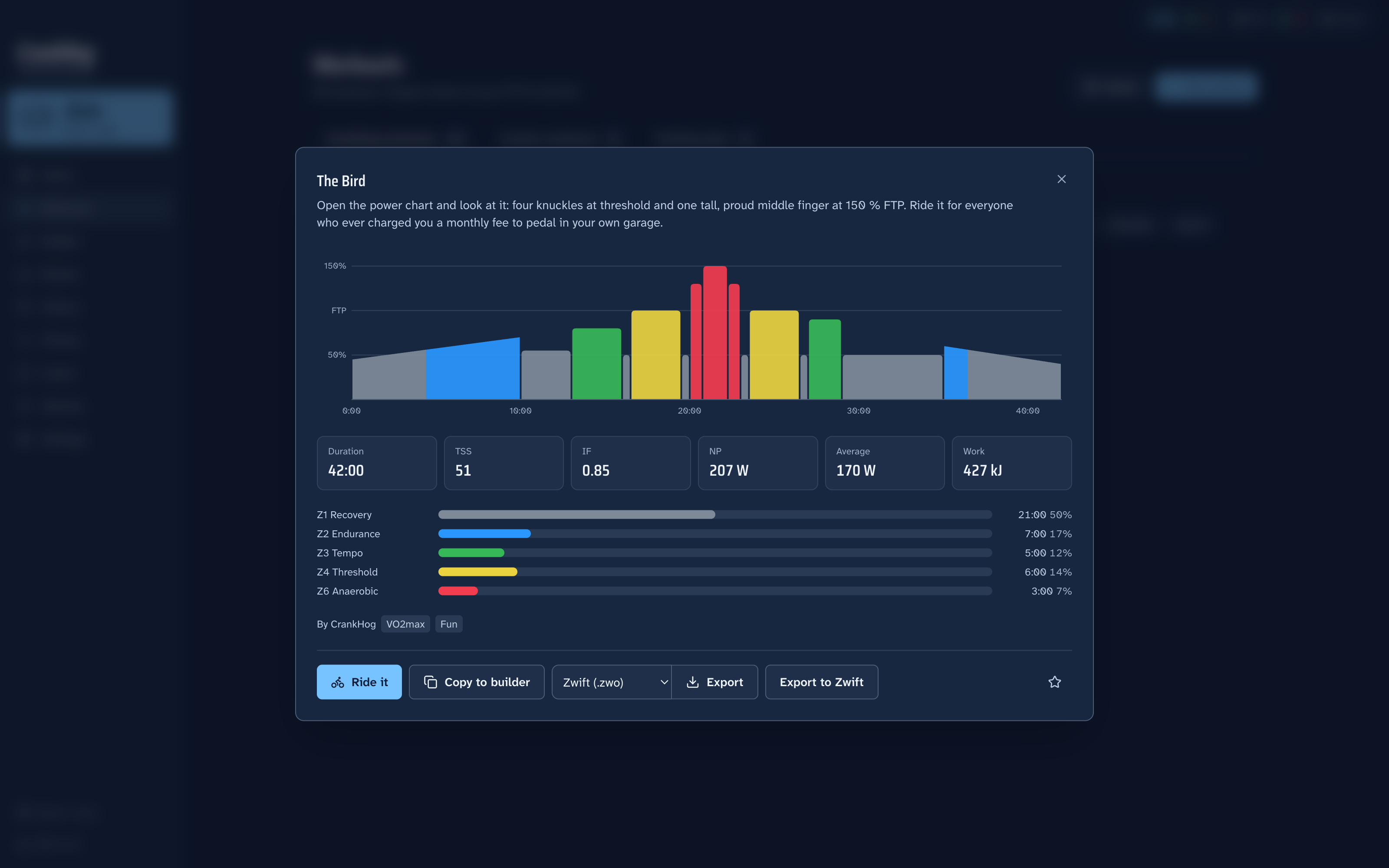
Eight rude workouts where the power chart is the joke. The Bird is four knuckles at threshold and a middle finger at 150 % FTP. Mount Stupid is the Dunning-Kruger curve. Stairway to Hell has no landing. Liar Liar says "last one" seven times.

The other four have names that don't belong on a homepage.

The Bird: a workout whose power profile is a hand with the middle finger raised, at 150 % FTP

A builder for the ones nobody has written yet

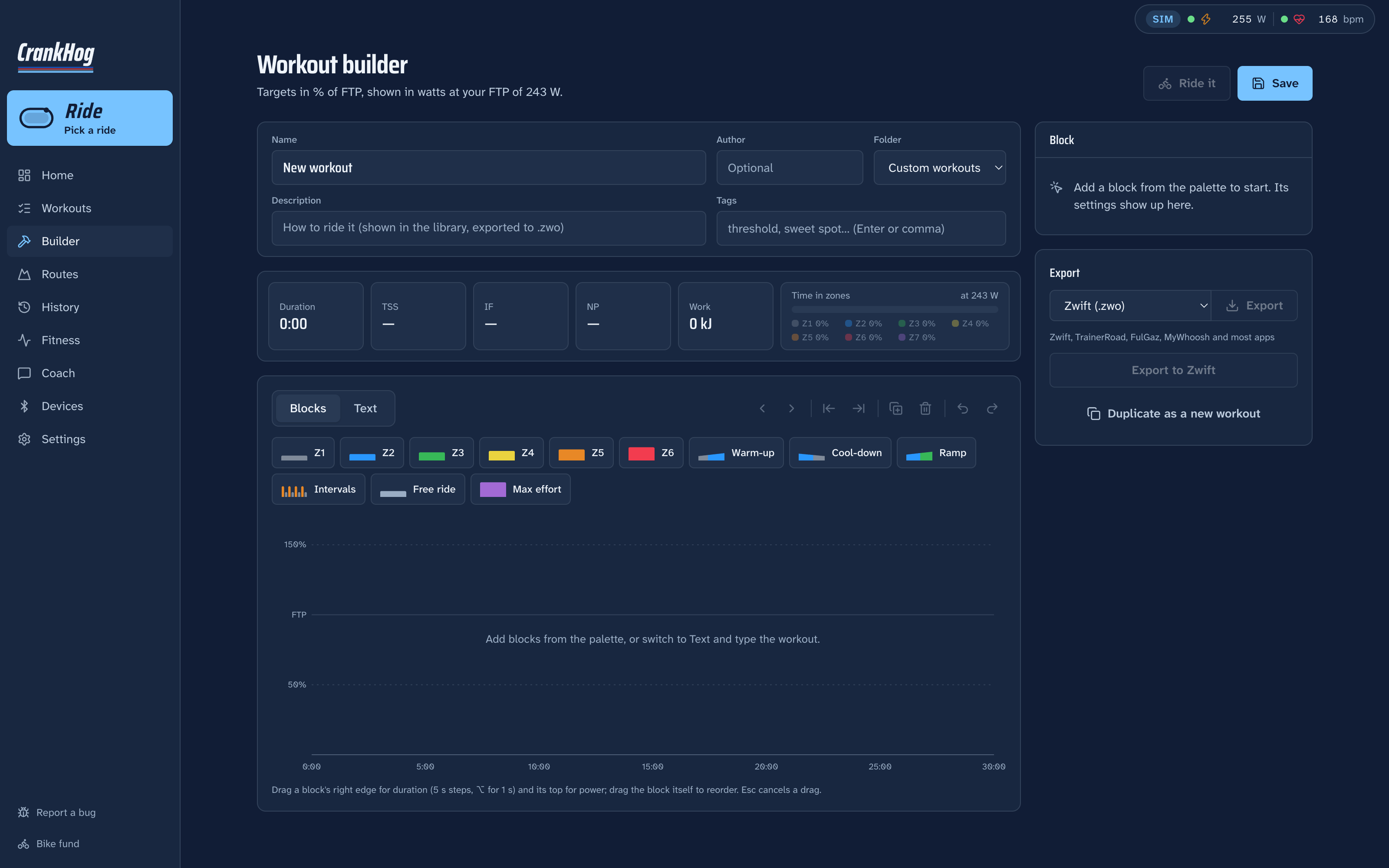
Drag blocks, resize them, type intervals.icu text, or describe it and let the AI write it. Live TSS, IF and zone totals at your FTP.

Import .zwo, .mrc and .erg, and export straight into Zwift's custom workouts. Runs and swims get a builder of their own: sections and repeats, distance or time, and pace or heart-rate targets.

The builder: name, author and folder, live TSS, IF and zones, blocks you drag and resize, and export to Zwift

Real roads, real gradients

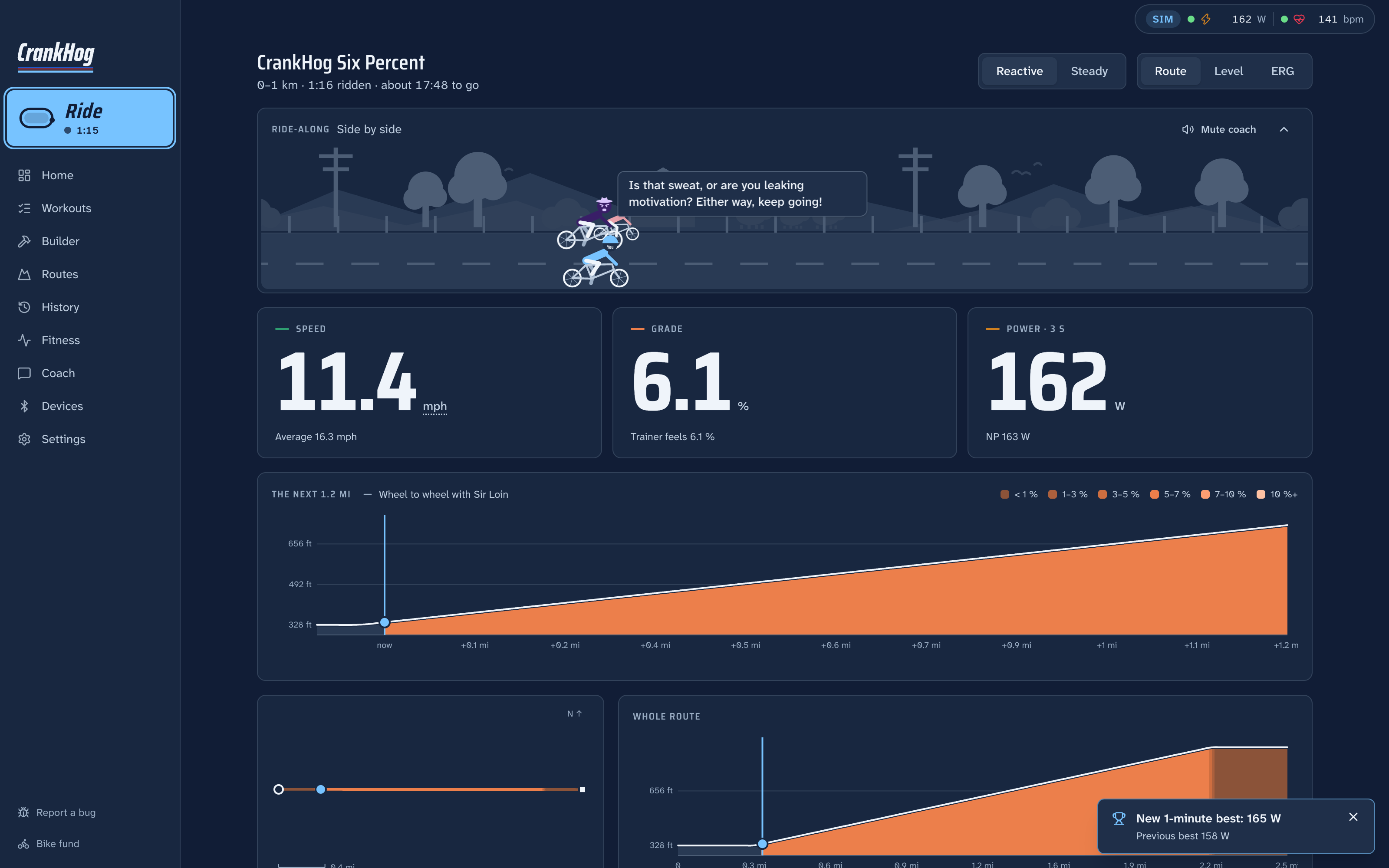
Import a GPX and the trainer climbs when the road does. Race a ghost of your last attempt if you're feeling brave.

Or turn on Journeys and ride somewhere real: Land's End to John o' Groats, the Danube, Route 66 or Tokyo to Hiroshima. Each ride picks up where the last one stopped, and lands on Strava with a map.

A route ride on a 6 % climb: speed, grade and power, the ride-along, and the next two kilometres of elevation

Everything it does

All of it, for nothing

Riding

  • ERG, level, slope and heart-rate modes
  • Soft start and a "spiral of death" guard
  • Skip, repeat or extend intervals; intensity in 1 % steps
  • Interval rescue when a hard rep is failing
  • FTP tests that save your FTP
  • GPX and TCX routes: reactive, steady or ghost race

Seeing everything

  • Over 40 HUD metrics in tiles you arrange
  • NP, IF, TSS, W′bal, L/R balance, DFA-α1
  • A mini-HUD that floats over Netflix
  • Phone remote by QR code
  • Spotify and Apple Music controls
  • Night and light themes, metric or imperial

Building workouts

  • A zwofactory-style drag-and-drop builder
  • intervals.icu text mode, synced both ways
  • A run and swim builder: pace, HR or % of threshold
  • Import .zwo, .mrc, .erg
  • Export to Zwift
  • Optional AI: describe it, then edit it

Coaches

  • Twenty-seven personas with faces and a voice
  • Your own coach: name, photo, personality
  • Spice 1–5, profanity Clean to Unhinged
  • The ride-along: pace them or drop them
  • Countdown beeps before every interval ends
  • Mute with C; safety prompts still get through

The coach chat

  • Claude, OpenAI, Grok or a local Ollama
  • Knows your plan, calendar, races and every sport
  • Proposes changes as a card you apply or undo
  • Builds a whole plan in the conversation
  • Reads your coach's plan from a spreadsheet, Word or PDF
  • A master prompt and notes, so it knows you

Calendar and plans

  • A month of planned and done, dragged where you like
  • A, B and C races, rest, sick and travel days
  • Plans built for you, imported, or started empty
  • Plans that count back from race day
  • Planned against done, by sport, every week
  • Your plan in Google Calendar

Runs, swims and the rest

  • Runs, swims and squash next to your rides
  • From your watch's FIT files, intervals.icu, or by hand
  • Load on the same scale as ride TSS
  • Swims counted in metres or yards
  • Planned runs and swims to your Garmin
  • Fitness and form count every sport

Your history

  • Every ride, newest first, and an optional AI debrief
  • Fitness, fatigue and form; power curve; FTP history
  • A plain-English fitness overview
  • A FIT file for every ride
  • Import old Garmin and Wahoo FIT files
  • Full backup and restore as a zip

Works with

  • Bluetooth smart trainers (FTMS and Wahoo)
  • Heart-rate straps and Garmin HR broadcast
  • Power meters, speed and cadence sensors
  • Headwind fans, CORE and Moxy
  • Strava, intervals.icu, Google Calendar and Garmin Connect (FIT)

Tested on a Wahoo KICKR and a heart-rate strap. Everything else follows the Bluetooth specs and is tested against a simulator.

Your data

Your rides stay yours

Everything lives on your Mac: the ride database, plus a FIT file per ride in ~/Documents/CrankHog/Rides. Point that folder at iCloud Drive for free sync.

Nothing leaves the machine unless you connect Strava, intervals.icu or Google Calendar, turn on an AI provider, let Claude use CrankHog, ride with others, use the real journey map, or send a bug report. API keys are encrypted with your macOS Keychain.

Your AI provider gets what you keep in CrankHog when you chat: rides, other sports, plans and the calendar. Never your name, and never anything from Strava. Google Calendar gets only your planned sessions, in a calendar of their own.

On your phone

No app store needed

Open CrankHog in your phone's browser and add it to your home screen. It gets its own icon, opens full screen and works offline, which is handy, because the pain cave never has Wi-Fi.

Android (Chrome)

The full experience, trainer included.

  1. Open the link in Chrome.
  2. Tap ⋮ → Add to Home screen → Install.
  3. Open More → Devices and pair your trainer and strap.

iPhone and iPad (Safari)

Everything except Bluetooth: Apple doesn't let any iPhone browser talk to trainers or straps.

  1. Open the link in Safari.
  2. Tap Share → Add to Home Screen → Add.
  3. Use the library, builder, history and coaches. Ride on the Mac or Android.

On its way: a native iPhone app that pairs with your trainer and strap over Bluetooth, so you can ride from an iPhone too. It's in Apple's review now.

Open CrankHog on your phone

Download

Get on the bike

Mac

Needs a Mac with Apple Silicon and Bluetooth.

  1. Download CrankHog-1.4.0-arm64.dmg and drag CrankHog to Applications.
  2. Open CrankHog. It's signed and notarized by Apple, so macOS only asks the usual "downloaded from the Internet" question. Click Open.
  3. Quit Zwift and the Wahoo app so CrankHog can control the trainer, then press Connect trainer.

Download for Mac

From source

Needs Node 24 or later.

git clone https://github.com/raytfitzgerald/CrankHog
cd CrankHog
npm install
npm run dev

No trainer handy? CRANKHOG_SIM=1 npm run dev runs it against a simulated KICKR and heart-rate strap.

Read the code on GitHub · Report a bug